

Can you watch Stripchat without registration?
The short answer is no—you cannot use all features without creating an account.
However, you can still watch public live streams for free as a guest without signing up.
Here’s what you cannot do without an account:
- Join private (paid) chats
- Send messages or interact with performers
- Use remote control or request features
In other words, you can watch for free, but interaction requires registration.
In this guide, we’ll explain exactly what you can and cannot do as a guest, along with safety tips and how Stripchat works.
What is Stripchat?
Stripchat is a global adult live chat platform used by millions of people worldwide. Known among fans and models alike as “StroCha,” it’s one of the fastest-growing live cam services available today.
What sets Stripchat apart from other services — especially Japanese domestic platforms — is its exceptional value for money. Content that costs money on local services is completely free on Stripchat: no registration required, no time limits, no paywalls for public streams.
3 Reasons People Choose Stripchat
- 🆓 Free to watch: No account needed. Watch public streams for as long as you like — no time limits, no fees.
- 💰 Unbeatable value: Even paid features cost a fraction of what domestic services charge. Tokens start from as little as $0.11 each.
- 🇯🇵 Japanese models available: A growing number of Japanese models stream on Stripchat, and the site supports Japanese display language.
Models broadcast live from home, rental rooms, or hotels using webcams or smartphones. The main format involves models performing on camera while viewers interact via text chat. Public streams are free and open to all, while paid options like Group Chat, Ticket Shows, and Private Chat offer more exclusive experiences.
| Feature | Typical Domestic Services | Stripchat |
|---|---|---|
| Public stream viewing | Paid, time-limited | Free, unlimited |
| Registration required | Often required to watch | Not required to watch |
| Uncensored content | Mosaic censorship | Uncensored |
| Japanese models | Many | Many & growing |
| Pricing | Expensive | Best value |
If you want to try it yourself, you can start watching public streams right away without creating an account.
What Do Models Do?
Stripchat models broadcast live from their homes or rental rooms, performing based on viewer requests and tips.
- Toy Play
-
Many models wear remotely controllable toys during their streams and react to user-triggered vibrations. Some models put on toys partway through the stream. If a model is doing a talk-only stream, they usually mention it in their profile or stream title.
- Conversation
-
Models respond to text messages from users.
- Request Play
-
Models fulfill requests listed in their tip menu.
The content of requests is set in advance by the model. - Roulette Play
-
Models perform whatever comes up on a roulette wheel spun by the user.
- Paid Chat
-
Models satisfy users through 2+1 types of paid chat. Which type to use is usually decided in advance by the model, though they may also ask for user preferences during the stream.
Ticket Show
A flat-rate format where users pay once to watch the full show.
Group Chat
Billed per minute (tokens). Great for joining or leaving partway through a show.
Private Chat
A one-on-one chat session.
Users can request this if they can’t wait for a Ticket or Group Show, or simply want the model all to themselves.
Full two-way audio and video is possible. Pricing tends to be significantly higher. - Couples Streaming
-
Some models broadcast as couples, both Japanese and international. You can watch them perform together in real time.
How to Use Stripchat
Browse thumbnails of models currently online and enter the public chat of anyone who catches your eye.
You can filter by country, type, and activity using the left-side menu.
No registration required, no time limits, and completely free.
Public chat streams are free to watch without limits, but to write in the chat you will need:
- An account
- A registered credit card
- Tokens (coins)
Same as above — tokens are required. Each action consumes tokens according to the menu.
Ticket Shows, Group Chats, Private Chats — tokens are consumed according to the format set by the model.
Coins (Tokens)
Stripchat uses a virtual currency called coins (or tokens) to unlock interactions and premium features with models.
What you can do with coins
- Tips: Send tokens to your favorite model as appreciation or to make requests
- Toy control: Remotely operate the model’s connected devices
- Paid chats: Ticket shows, group chats, and private chats
- Content purchases: Photos, videos, and more
Watching public streams is always free — no coins or account required.
Price at a glance
Packages start from 90 tokens / $9.99. Buying larger packages gives you a better rate per token. Credit card payment gives you more tokens than PayPal for the same price.
For a full breakdown of token packages, payment methods, and how to get the best value, see our dedicated pricing guide.
Safety & Security on Stripchat
Security Measures
Stripchat implements the following security measures to protect its users:
- SSL Encryption: All communications and payment data are encrypted and protected.
- Two-Factor Authentication (2FA): Available to prevent unauthorized access to your account.
- Payment Anonymity: The site name does not appear on your credit card statement.
- External Security Audits: Stripchat participates in HackerOne’s Bug Bounty Program, where external security experts continuously test for vulnerabilities.
Past Incident
In 2021, during maintenance work, a database was temporarily left accessible from outside. However, no unauthorized access to user personal information or payment data was confirmed, and the issue was addressed promptly after discovery. Additional security measures have since been implemented to prevent a recurrence.
Tips for Safe Use
- Use a strong, unique password
- Enable Two-Factor Authentication (2FA)
- Always log out when using a public or shared computer
How to Create an Account on Stripchat
You can watch Stripchat for free without registering, but an account and tokens are required to chat and make requests. Here’s how to create your account.
Enter a username of your choice, then your email address. (Google or X accounts are also accepted.)
Be sure to note these down carefully and double-check for typos.
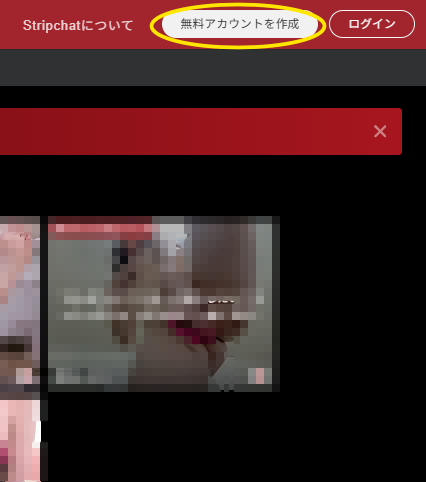
Click “Verify email address” and a temporary password will be issued.
Set a memorable password and you’re ready to go.
How to Delete Your Account
Since Stripchat has no registration fee or monthly charges, there is no real need to delete your account. However, if you are concerned about stored card information, you can delete your account using the steps below.
Please note that any remaining tokens and user level will be permanently lost.
The process is very straightforward.
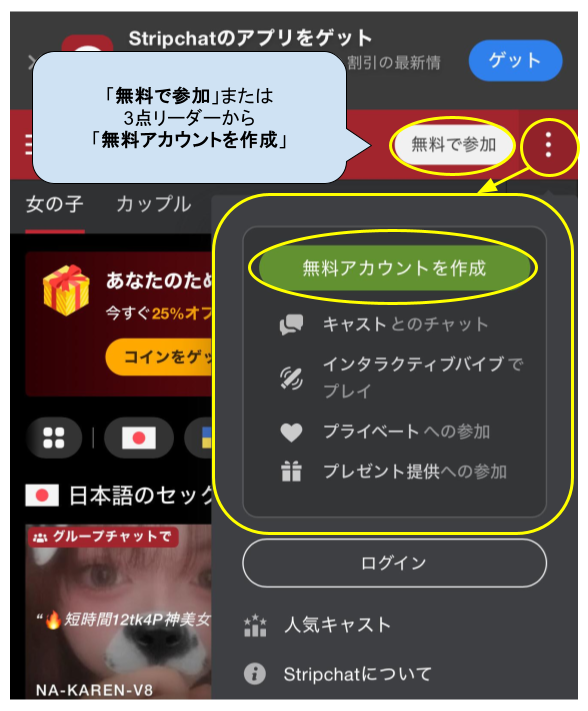
- Click your user icon in the top right corner (on mobile, tap the three-dot menu). You must be logged in.
- Select “Privacy and Settings.”
- Click “Delete Account.”
Ultimate Membership
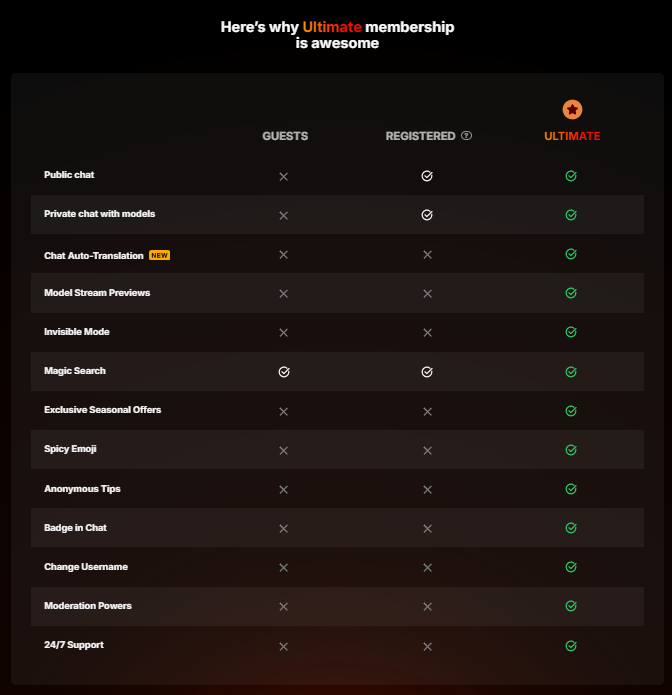
Separate from tokens, Stripchat offers an Ultimate Membership — a paid subscription that unlocks a range of account perks designed to enhance your experience on the platform.
Pricing
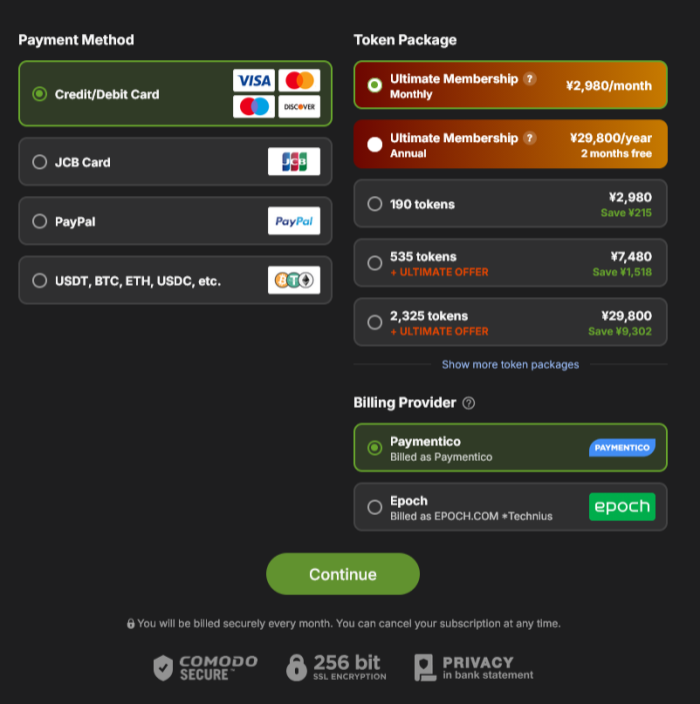
- Monthly: $19.99/month
- Annual: $199.99/year (equivalent to 2 free months)
What You Get with Ultimate
| Perk | Details |
|---|---|
| Unlimited Private Messages | Send and receive unlimited private messages with any model |
| Invisible Mode | Hide your username in a model’s room (your name still appears when you tip or message) |
| Anonymous Tips | Tip models without revealing your identity — separate from Invisible Mode |
| Chat Auto-Translation | Automatically translate model messages in private chat |
| Model Stream Previews | Hover over thumbnails to sneak peek a stream before entering |
| Spicy Emoji | Use adult-themed emoji in chat — including Stripchat’s own animated exclusive emoji, beyond standard keyboard emoji |
| Ultimate Badge | A ★ badge displayed next to your name in chat |
| Change Username | Change your username and profile link at any time |
| Knight Status | Models can appoint you as a Knight to help moderate their chat room — for example, posting announcements on the model’s behalf, such as letting users know a Ticket Show is ending soon |
| Exclusive Promotions | Access to special token package discounts for Ultimate members only |
| 24/7 Support | Priority access to live chat support |
7-Day Free Trial
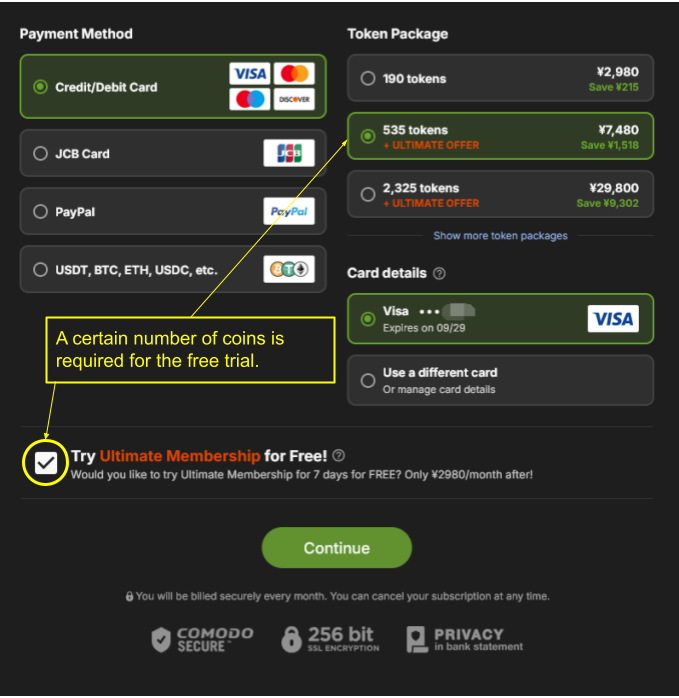
When purchasing certain token packages, you can try Ultimate Membership free for 7 days.
Requirements
- Available to first-time Ultimate subscribers only
- Credit card purchases only
- You must tick the confirmation box to opt in
Important Notes
- After the trial, billing starts automatically — cancel during the trial period if you don’t want to continue
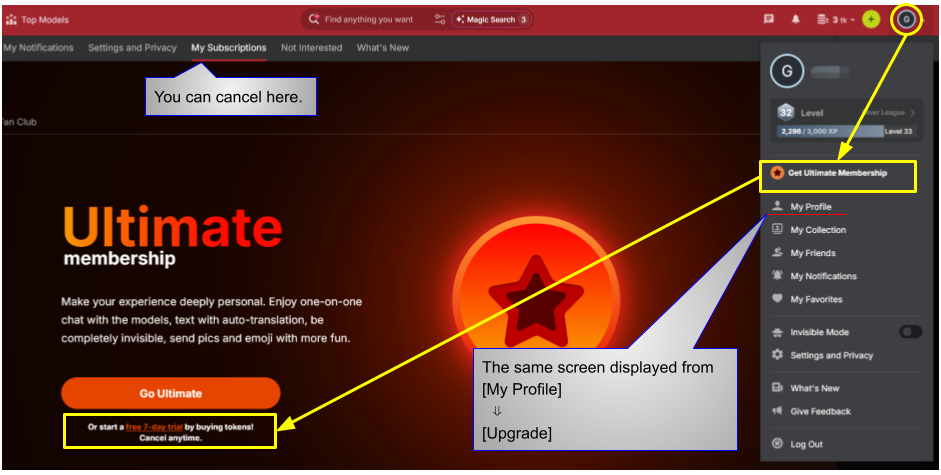
- Cancel anytime from the My Subscription tab
💡 A minimum token purchase is required to unlock the free trial offer.
⚠️ The token amount and eligibility conditions may change over time. Always check the purchase screen for the latest details.
Which option is right for you?
Already have tokens and just want to try Ultimate?
→ The standard monthly plan is cheaper and more straightforward.
Planning to buy a larger token package anyway?
→ The 7-day free trial is a great way to try Ultimate at no extra cost.
How to Subscribe
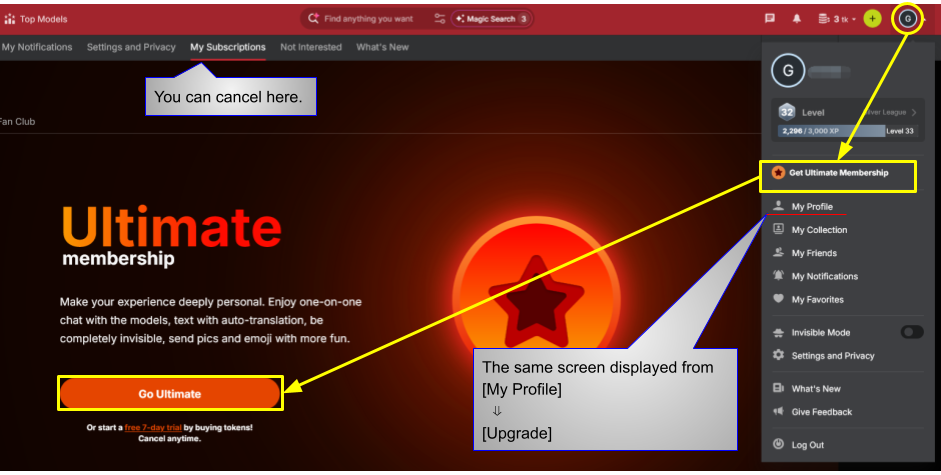
Click “Get Ultimate Membership” below your username on your profile page, or go to Profile → Upgrade.
To access the 7-day free trial, select “Get Ultimate Membership” from the account icon menu, or go to Profile → Upgrade. The trial offer will appear on the purchase screen.
To cancel, go to the same screen and select the My Subscription tab.

A minimum token purchase is required. Check the box for “Try Ultimate for free!” to activate the trial.
Note: the token amount and pricing may change due to exchange rates or platform updates.
※ Screens and procedures may differ due to platform updates.

Basic Information Summary
| Item | Details |
|---|---|
| Operator | Technius Ltd |
| Headquarters | Republic of Cyprus |
| Token value (approx.) | ~$0.10 per token |
| Sign-up bonus | None |
| Discounts | Bonus tokens, Fan Club discounts, etc. |
| Token usage examples | Public Chat: Free / Group Chat, Ticket Show, Private: Model-set pricing |
User Leagues & Levels
Stripchat has a league and level system for users. This is why you’ll see different coloured names and badges in the chat. Higher levels come with more perks — and more attention from models.
If you spot a user with a red name and a ★ badge, that’s a Legend — the highest level possible. Let’s just say they’ve invested heavily in the platform 😄
Earning XP and Levelling Up
Levels are based on XP (experience points). Here’s how to earn them:
| Action | XP Earned |
|---|---|
| Spend tokens (tips, paid chats, etc.) | 5 XP per token |
| First token purchase ever | 500 XP (once only) |
| Verify your email address | 5 XP |
| Watch streams (up to level 9 only) | 1 XP per 15 min |
| Subscribe to a Fan Club | XP shown at purchase |
The 7 Leagues
There are 7 leagues in total, each with a different badge colour and username colour. Higher leagues come with more perks.
| League | Levels | Badge / Name Colour | Key Perks |
|---|---|---|---|
| Grey | 1–9 | Grey | New accounts start here. Models can disable chat for Grey users |
| Bronze | 10–19 | Bronze (brown) | First token purchase moves you to Bronze Lv10. Can become ex-Bronze if tokens run out |
| Silver | 20–34 | Silver | Can make photo albums public. Can become ex-Silver if tokens run out |
| Gold | 35–54 | Gold | Badge retained even if tokens run out |
| Diamond | 55–79 | Purple | Can mask league and level to show a different one |
| Royal | 80–99 | Red | Ultimate membership for life · masking · concierge support |
| Legend | 100 | Red + ★ | All perks · Ultimate for life · exclusive red ★ badge |
| Ultimate Member | Any | Orange ★ | Unlimited private messages · Invisible mode · Anonymous tips · Spicy emoji and more |
What the Username Colours Mean
- Grey: Has never purchased tokens
- Brown (Bronze): Has made at least one token purchase
- Silver: Has spent a decent amount of tokens over time
- Gold: A regular spender
- Purple (Diamond): A serious regular
- Red (Royal): A heavy spender — often treated with extra attention by models
- Red + ★ (Legend): Level 100. The highest status on the platform. Basically a god 😄
The Ultimate Badge (Orange ★)
Separate from the league system, Ultimate members display an orange ★ badge. Ultimate membership can exist at any league level — for example, a Diamond user who is also an Ultimate member will show a purple username plus the orange ★ badge.
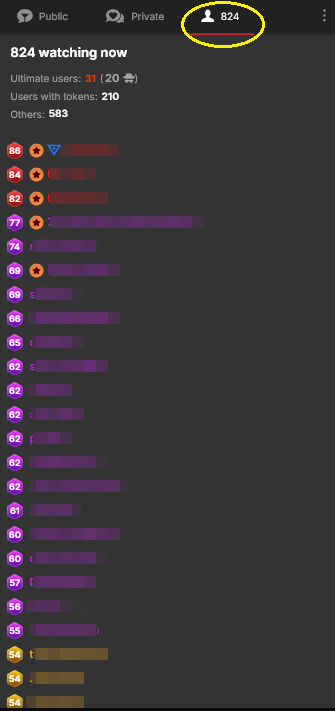
Who’s in the Room?
Inside any model’s room, you can check the number of viewers and their league levels.
Types of Chat
Stripchat uses a very different pricing model compared to many other live chat platforms.
One of its biggest features is that the equivalent of a “Party Chat” — which is paid on many Japanese platforms — is available completely free with no time limit and no registration required.
Here is an overview of the basic chat formats:
Public Chat (Free)
- Free chat open to everyone (no registration required)
- Watch freely with no time limits
- Token uses in Public Chat:
- Tips
- Remote toy control (e.g., 1 token = 2 seconds of vibration)
- Posting comments (requires a token balance)
Ticket Show
- A flat-rate paid show initiated by the model
- Only users who pay can watch and participate
- Content is usually more explicit than the public show
- Pricing is set by the model (e.g., 8 to 200+ tokens)
Group Chat
- A paid chat format
- Billed per minute (e.g., 10 tokens/min)
- Great for joining or leaving mid-show
- Costs can add up quickly for long sessions
Private Chat
- A one-on-one session
- Some models may not offer it by default, but may agree if requested
- Pricing is set by the model
Video Call (Exclusive Private / Cam2Cam)
- Two-way chat (your video and audio are shared with the model)
- Allows for a more intimate interaction
- Typically initiated by the user
VR Shows
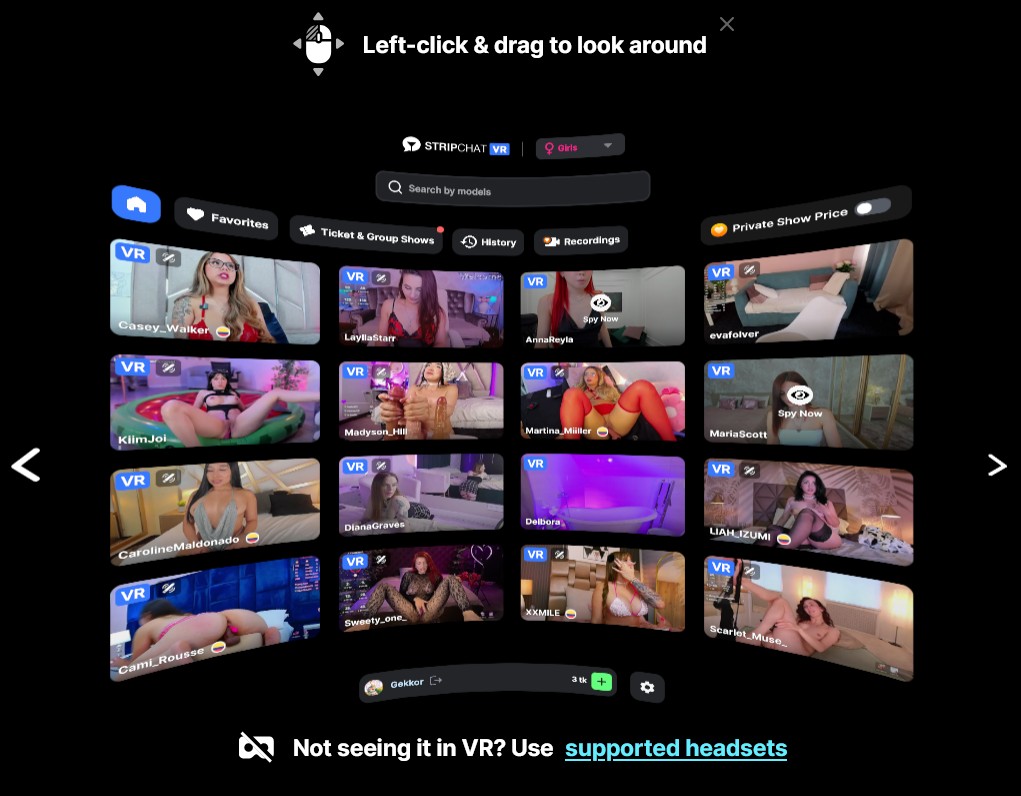
Some models stream in 4K full VR. With a compatible VR headset, you can enjoy a fully immersive experience — available in both public and private shows.
Models streaming in VR will have a VR icon on their thumbnail. You can also browse all VR streams under the “VR Cams” category.
VR dedicated page: vr.stripchat.com
Supported Headsets
Recommended devices
- Meta (Oculus): Quest / Quest 2 / Quest 3・3S / Quest Pro / Rift / Rift S
- Apple Vision Pro
Also supported (functionality and performance may vary by model)
- Valve Index
- HP Reverb
- HTC Vive Pro / Vive Pro 2
- Pico 4
- Android mobile devices that support VR with Cardboard (newer models recommended)
How to Get Started
Make sure you’re using a supported device.
Use Meta Browser, Safari, or your headset’s built-in browser. No third-party apps or downloads required.
That’s it — your immersive experience starts here.
Live Chat Price Comparison (20-Minute Benchmark)
※ Based on 1 USD = 150 JPY exchange rate.
※ Stripchat pricing varies as models set their own rates.
※ Conversion based on Stripchat’s smallest package: 88 tokens ≈ $9.99 (1 token ≈ $0.11).
| Site | Party Chat (20 min) | 2-Shot (20 min) | Private / Cam2Cam (20 min) |
|---|---|---|---|
| FANZA Adult | ~$13 | ~$33 | ~$53 |
| Jewel Live | ~$22 | ~$37 | ~$73 |
| FANZA Wives | ~$13 | ~$20 | ~$20 |
| Madam Live | ~$15 | ~$22 | ~$73 |
| DXLIVE | − | ~$34–$50 | ~$49–$73 |
| Stripchat | Free – ~$18–$73 | ~$27–$200 | ~$27–$200 |
Stripchat Pricing Notes (※)
- Pricing model: Models on Stripchat set their own per-minute rates. There is no fixed platform pricing.
- Conversion rate (reference): 90 tokens = $9.99 → 1 token ≈ $0.11
- Group Chat (paid party-style): 8–32 tokens/min → approx. $18–$70 for 20 minutes
- Ticket Show (flat rate): 90–250 tokens/show → approx. $10–$28
- Private Chat (1-on-1): 12–90 tokens/min → approx. $27–$200 for 20 minutes
※ The above are general estimates. Actual costs vary depending on the model’s settings, token packages purchased, and any promotions or bonus tokens available.
How to Navigate Stripchat
Here’s a quick guide to get you started on Stripchat.
The interface is intuitive, so you’ll get the hang of it quickly. This is just to help you get started.
Hovering over icons on the site will display tooltips explaining each function.
Home Screen
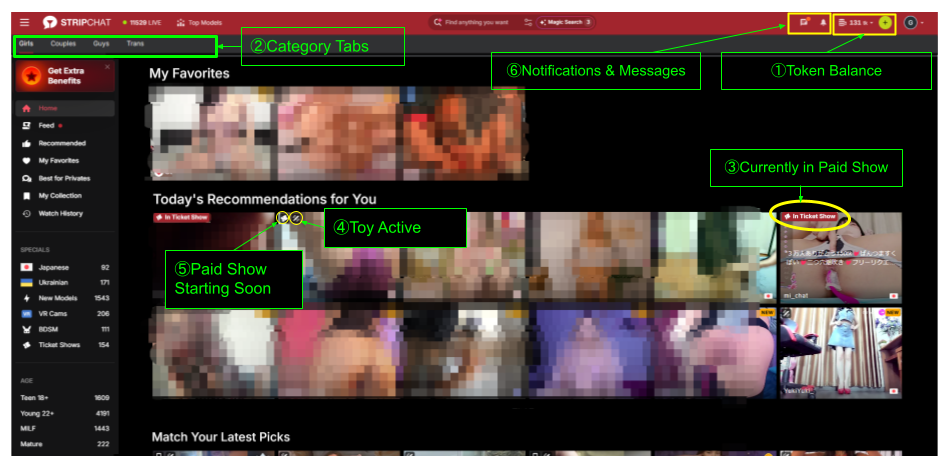
- ① Token Balance
-
Once logged in, your current token balance is displayed. Click the “+” icon or the dropdown next to it to purchase more tokens. We recommend the “+” icon as it shows token amounts and payment options clearly.
- ② Category Tabs
-
Filter by Girls, Couples, Men, or Transsexual.
- ③ Currently in Paid Show
-
Shown when a model is currently in a Ticket Show or Group Chat.
- ④ Toy Active
-
Indicates whether the model is wearing a remotely controllable toy.
- ⑤ Paid Show Starting Soon
-
Shown when a model announces an upcoming paid show. A Ticket Show icon appears for ticket shows; a different icon appears for Group Chats as shown below.

- ⑥ Notifications & Messages
-
- Bell icon: Displays campaign info and model-related notifications.
- Chat bubble icon: Friend requests and messages from models appear here.
Chat Room
Here’s an overview of the menu inside a model’s room.
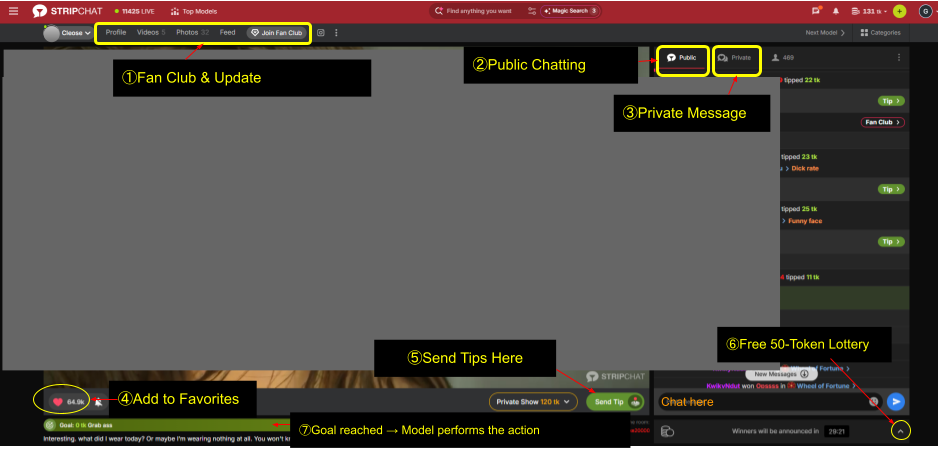
- ① Fan Club & Updates
-
- Profile: The model’s profile information
- Videos: Videos viewable even when offline (usually Fan Club members only)
- Photos: Photos viewable even when offline (usually Fan Club members only)
- Feed: The model’s recent updates and streaming schedule
- Join Fan Club: Subscribe to the model’s Fan Club from here
- ② Public Chat
-
The chat visible to all users. Models read this to respond to questions and requests. You’ll often see friendly conversations between users as well.
- ③ Private Message
-
Send a direct message to the model that other users cannot see. (Fan Club members and Ultimate members only)
- ④ Add to Favorites
-
Save your favorite models and they’ll appear at the top of your list when they go online. You can also enable email notifications for when they start streaming.
- ⑤ Send Tips Here
-
Mainly used for:
- Sending tips with a message to the model
- Submitting tip menu requests
- Controlling the model’s interactive toy remotely
- ⑥ Free 50-Token Lottery
-
Enter a free lottery for 50 tokens, held every hour. Even if you don’t win, you can try again next time.
- ⑦ Goal reached → Model performs the action
-
When the total tips from all users reach the model’s preset goal, the model performs a pre-set action as a reward.
Click the account icon in the top right of the screen, then select the icon or “My Profile” from the menu that appears. This opens a menu bar at the top of the page, where you can manage your Ultimate membership, Fan Club subscriptions, and other account settings.
Explain menu bar in the profile window
This page lets you view and edit your own profile information. At the top you’ll see your cover image, avatar, and League/Level, with three sub-tabs: “Profile,” “Photos,” and “League & Level.”
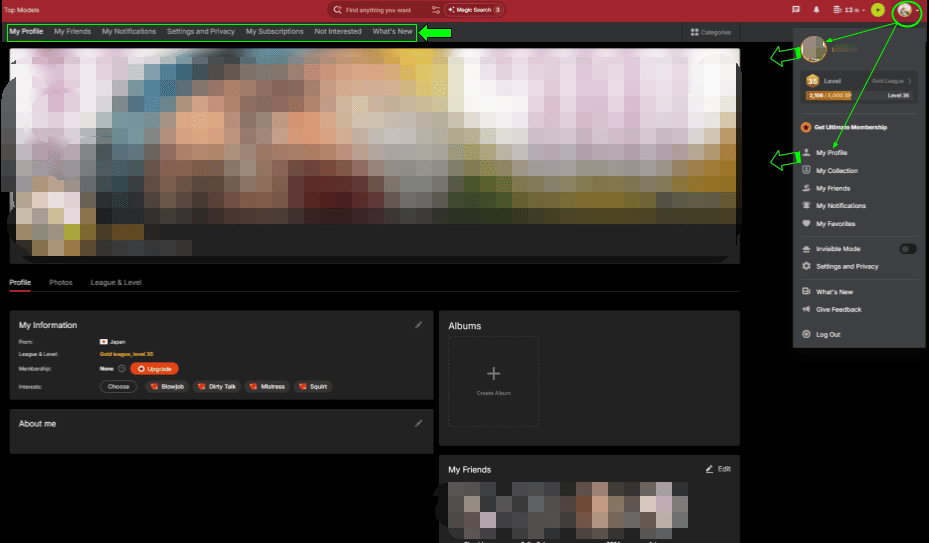
My Profile
My Information
Shows and lets you edit your location, League/Level, membership status (whether you’re an Ultimate member), and interests.
About Me
Lets you write and edit your self-introduction.
Albums
Lets you create albums to organize your photos.
My Friends
Shows a preview of your friends list (see the “My Friends” tab below for details).
My Friends
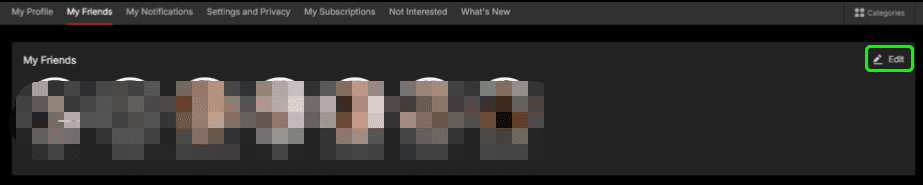
Displays a list of avatars for the users you’ve added as friends. Click “Edit” in the top right to remove friends from your list.
You can send private messages to models who are on your friends list.
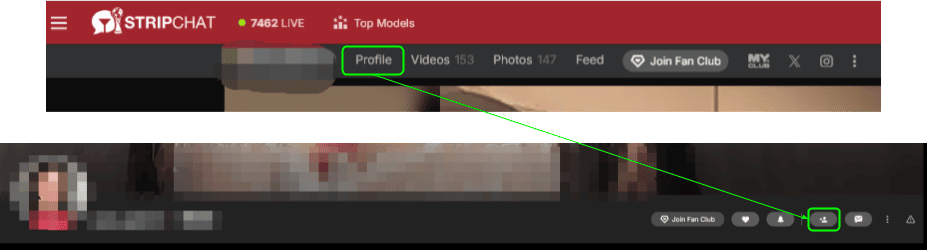
You can become friends with a model either by sending them a friend request yourself, or by accepting a request they send you. When a model sends you a request, you’ll see a notification on the bell icon in the top right — accept it from there.

*Note: Accepting a friend request sent by a model may result in frequent messages from them afterward.
Sending a friend request
My Notifications
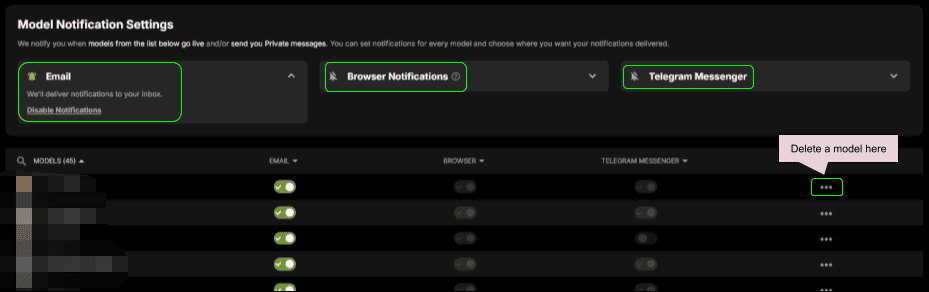
This is a settings page for receiving notifications when models you’ve added — via favorites, friends, etc. — go live or send you a private message.
There are three notification methods: “Email,” “Browser Notifications,” and “Telegram Messenger.” You can configure these individually for each model, or manage them all at once.
- Email: Notifications are sent to your registered email address. The “Disable Notifications” link lets you turn off all email notifications at once.
- Browser Notifications: You’ll receive notifications as long as your browser is open.
- Telegram Messenger: Click the connect button to link your Telegram account and start receiving notifications there. That said, Telegram isn’t widely used in Japan and the bot is English-only, so this option isn’t especially recommended.
Click the “…” button on the right of each row to remove a model from your notification list.
Settings and Privacy
- Privacy
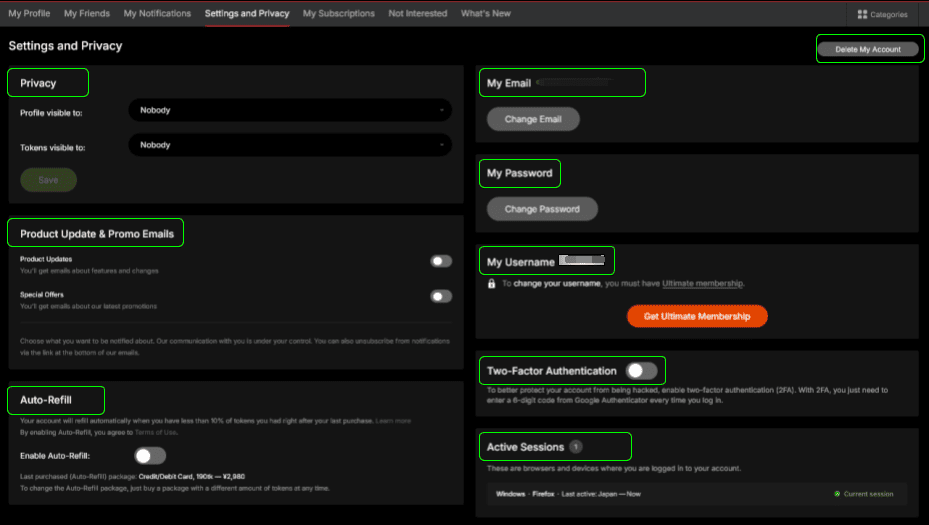
Lets you set “Profile visible to” and “Tokens visible to.” Choose a visibility level (e.g., “Nobody”) from the dropdown and click “Save” to apply. - Product Update & Promo Emails
Toggle “Product Updates” and “Special Offers” emails on or off independently. - Auto-Refill
When your token balance drops below 10% of your last purchase, this feature automatically refills your tokens. When enabled, it repurchases the same package (payment method, token amount, and price) as your last purchase. To change the package used for Auto-Refill, simply purchase a different-sized package.
*Note: Enabling this will keep auto-charging your card on file, so we recommend leaving it OFF. - My Email
Shows your registered email address and lets you change it via “Change Email.” - My Password
Lets you change your password. - My Username
Your username is shown here, but changing it requires an Ultimate membership. - Two-Factor Authentication
Turning this on requires entering a 6-digit code from Google Authenticator each time you log in, adding extra security to your account. Setup involves scanning a QR code and installing an app, so it takes a bit of extra effort. - Active Sessions
Shows a list of browsers and devices currently logged into your account, including OS, browser, last activity time, and region. This is for viewing only — you can’t log out individual sessions from here. - Delete My Account
Click the button in the top right to delete your account. Your account becomes inactive immediately, and you’ll stop receiving emails and notifications from the site. Your data is automatically and permanently deleted 18 months after deletion — no further action is required on your part.
To delete your account, click the button to open a pop-up, optionally select a reason, check the confirmation box, and click “Do It” — your account is deleted immediately.
My Subscriptions
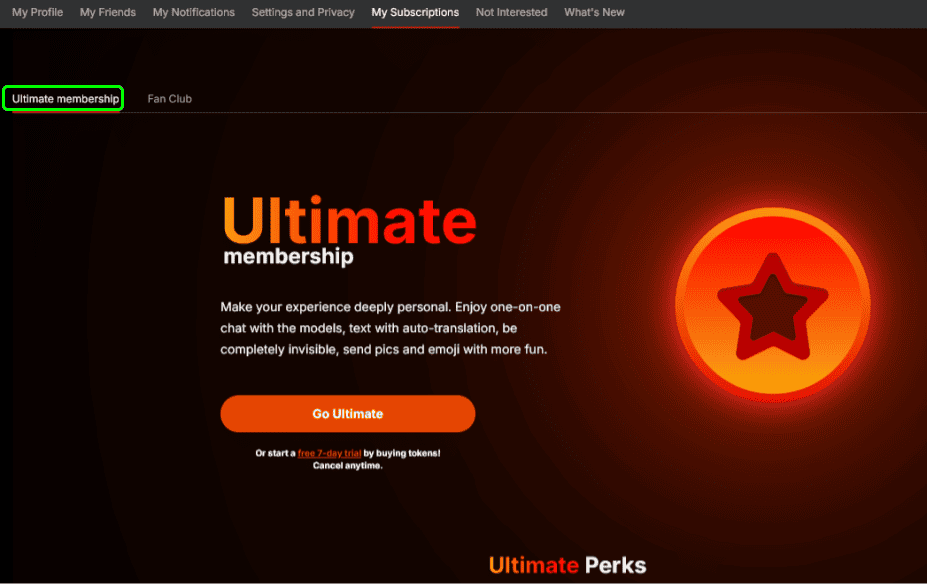
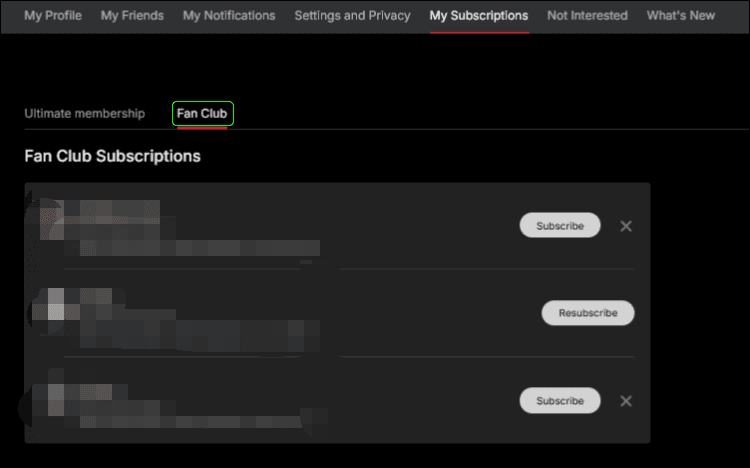
This tab is split into two sub-tabs: “Ultimate membership” and “Fan Club.”
Ultimate Membership
Introduces the perks of Ultimate membership and lets you manage your subscription. Perks include one-on-one chat, auto-translated messages, invisible/secret mode, and sending pics and emoji. Click “Go Ultimate” to sign up — a free 7-day trial is available, and you can cancel anytime.
Fan Club
Shows a list of the model-specific paid Fan Club subscriptions you’ve joined, where you can manage them. Click “Subscribe” to join a model’s Fan Club (or “Resubscribe” if you’d previously left), and click the “×” to unsubscribe.
Not Interested
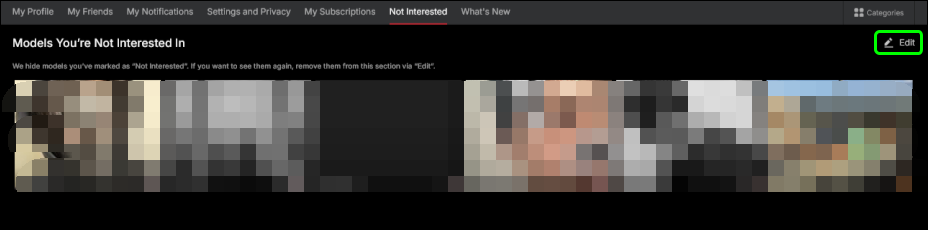
This feature lets you hide models you don’t want to see on the homepage and elsewhere. Click the vertical three-dot menu (⋮) on a model’s thumbnail and select “Not Interested” to stop that thumbnail from being shown — useful if a model doesn’t match your preferred categories, or you simply don’t want to see them.
This tab shows a list of all the models you’ve marked “Not Interested.” To make one visible again, click “Edit” in the top right to undo it.
What’s New
This page shows the latest news and updates from Faphouse.
Frequently Asked Questions
Is Stripchat really free?
Yes. You can watch public streams without registering, with no time limits and no cost. Tokens are needed if you want to chat, tip, or use paid features, but watching is completely free.
Do I need to register?
Not to watch. Registration is free and required only for chatting, buying tokens, favouriting models, and entering the token lottery. You can sign up with an email address or your Google / X account.
Can I use Stripchat on my phone?
Yes. Stripchat works in any mobile browser — no app required. Just open Safari, Chrome, or your preferred browser and go to Stripchat.com.
Will Stripchat appear on my credit card statement?
The site name does not appear directly on statements — charges are processed under a different name. Check the confirmation screen at the time of purchase for the exact billing descriptor.
What’s the difference between coins and tokens?
Nothing — they’re the same thing. Stripchat uses both terms interchangeably throughout the site. “Coins” and “tokens (tk)” refer to the same virtual currency.
Can I get a refund on unused tokens?
Under certain conditions, yes. Refunds are available for your most recent token package only, provided the tokens are unused, the purchase was made within the last 30 days, and payment was made by card or PayPal. Contact Stripchat support to request a refund.
Can I meet a model in person?
No. Arranging in-person meetings through the platform is explicitly prohibited under Stripchat’s Community Guidelines. Models choose to work online because it keeps them safe — please respect that. Sending messages asking to meet or requesting personal information can result in an immediate block from the model, and may be reported to Stripchat support, leading to account suspension even if you have tokens remaining.
Can I record or screenshot streams?
No. Recording during Cam2Cam shows without the consent of all participants is prohibited. Sharing or republishing any content from Stripchat on third-party sites or social media is also a violation of the terms of use.
Can I ask a model for their social media or contact details?
No. Directing users outside the platform is against Stripchat’s Community Guidelines for both users and models. Models are also prohibited from sharing outside contact details — doing so puts their account at risk too.
Is Stripchat available to minors?
No. Both models and users must be at least 18 years of age. Any violation related to minors results in an immediate permanent ban with no warnings.
A model didn’t do what they promised in their tip menu
Models are required by Stripchat’s Community Guidelines to perform everything listed in their tip menu. If a model fails to deliver what was agreed, you can report it to Stripchat support.
My account has been suspended
Stripchat uses a three-tier penalty system: warning, temporary suspension, and permanent ban, depending on the severity of the violation. Creating a new account after a permanent ban is also prohibited. If you believe the suspension was made in error, contact Stripchat support.


Comments